Security Cameras Around The House
security 20-12-2025
- Introduction
- Things to Know
- My Setup: The External Cameras
- My Setup: The Office
- Privacy
- Final Thoughts
- Thinking of Moving to the Philippines? Get Reliable Guidance
Introduction
So, you’ve gone to all the trouble of building a house in the Philippines. Even with the lower cost of living, there’s still a notable investment that has been made. You want it to be safe. You want you and your loved ones to be safe while living there. No guarantees in life, but one common approach to improve the overal security situation is to deploy a set of security cameras (locally, typically, referred to as CCTV cameras).
For those of you joining us for the first time, my girlfriend and I have built a house in a rural province in the Philippines. The closest big city and respectable hardware store is a two hour drive away.
Generally, I only have security cameras outside of the home. Let’s call that a privacy preference. The outdoor cameras send data to a third-party cloud service that has an app we can use to monitor the house from anywhere with an internet connection. Once that data flows outside my control, I’m at the mercy of the third-party cloud service and what they decide to do with the data.
Things to Know
Installing outdoor security cameras in the Philippines is not complicated, but doing it correctly requires adjusting expectations, equipment choices, and installation methods to local realities. This is not a plug-and-play suburb with predictable infrastructure, reliable power, and universal respect for property boundaries. Plan accordingly.
1. Understand the Environment First (Before You Buy Anything)
The Philippines is hot, humid, rainy, dusty, salty (near the coast), and occasionally visited by typhoons that treat exposed electronics as a personal challenge.
That means:
- Outdoor-rated cameras are not optional
- “Weather resistant” is marketing fluff; look for IP66 or IP67
- Cheap plastic housings crack, fade, or fill with ants
If a camera wouldn’t survive a Florida hurricane season or a Southeast Asian monsoon, don’t mount it here.
2. Power: Assume It Will Fail (Often)
See my commentary on the state of the local power grid in the Whole Home Battery Backup Solutions blog post.
Brownouts are normal. Planned outages, unplanned outages, “someone hit a pole,” and “no one knows” outages all happen.
Your options: *PoE (Power over Ethernet): Best for reliability and image quality *Battery-powered Wi-Fi cameras: Convenient but limited and maintenance-heavy *Solar cameras: Useful in rural areas, but only if mounted correctly and cleaned regularly
Pro tip: Put your cameras, router, and NVR on a small UPS. It’s cheap insurance and prevents your security system from becoming decorative during outages.
If you have the whole house on a battery backup solution or generator that automatically kicks in, that also works, but is far more expensive than a small UPS.
3. Internet Reality: Upload Speeds Matter More Than Brand Names
Many Philippine internet connections have:
- Decent download
- Terrible upload
- Occasional dropouts for no apparent reason
This affects:
- Cloud recording
- Live remote viewing
- Motion alerts
If your upload speed is under ~5 Mbps, it is recommended that you:
- Limit camera resolution
- Use local recording (NVR or SD card)
- Avoid systems that rely entirely on cloud streaming
Local recording keeps working even when the internet doesn’t—which is often.
My Starlink internet connnection is usually more than sufficient, but inclement whether does impact performance.
4. Placement: Theft, Vandalism, and “Curiosity”
Cameras mounted at eye level will:
- Get touched
- Get adjusted
- Get stolen
- Get pointed at the sky “by accident”
Best practices:
- Mount high enough to be out of reach
- Angle cameras downward
- Use metal housings where possible
- Avoid obvious cable runs
Also: do not assume visibility deters crime. In some areas, visibility advertises resale value. In fact, according to my girlfriend, having all the exterior lights on all night is probably the greatest deterent to crime in the rural provinces.
All of the cables needed for my cameras are inside conduit and generally out of reach, but with a ladder and angle grinder you can cut off power to the camera. You’re also going to draw attention to yourself and with any luck get a good zap when you cut into the power cable.
5. Privacy and Social Reality
Filipino neighborhoods are social, dense, and observant. Cameras aimed carelessly can create friction fast.
Avoid:
- Pointing cameras directly into neighbors’ windows
- Recording public roads unnecessarily
- Audio recording (often illegal or socially unacceptable)
A simple rule: secure your property, not everyone else’s business.
6. Weatherproofing Isn’t Just the Camera
Most failures happen at:
- Cable junctions
- Power adapters
- Ethernet couplers
Use:
- Outdoor-rated Ethernet
- Drip loops
- Junction boxes
Silicone sealant where appropriate
Water will find the weakest point. It always does.
So far, I haven’t had anything short circuit due to water, but gravity has done a number on electrical plugs over time.
7. Signs, Lighting, and Redundancy
Cameras alone are not magic.
Add:
- Motion lighting (very effective)
- Visible signage (“CCTV in Use”)
- Overlapping camera coverage
A camera that can’t see faces clearly is a suggestion, not security.
8. Maintenance Is Not Optional
Insects, dust, mold, salt air, and vegetation will interfere with lenses and mounts.
Plan to:
- Clean lenses every few months
- Check mounts after storms
- Test night vision periodically
If you “set it and forget it,” it will forget you first.
My Setup: The External Cameras
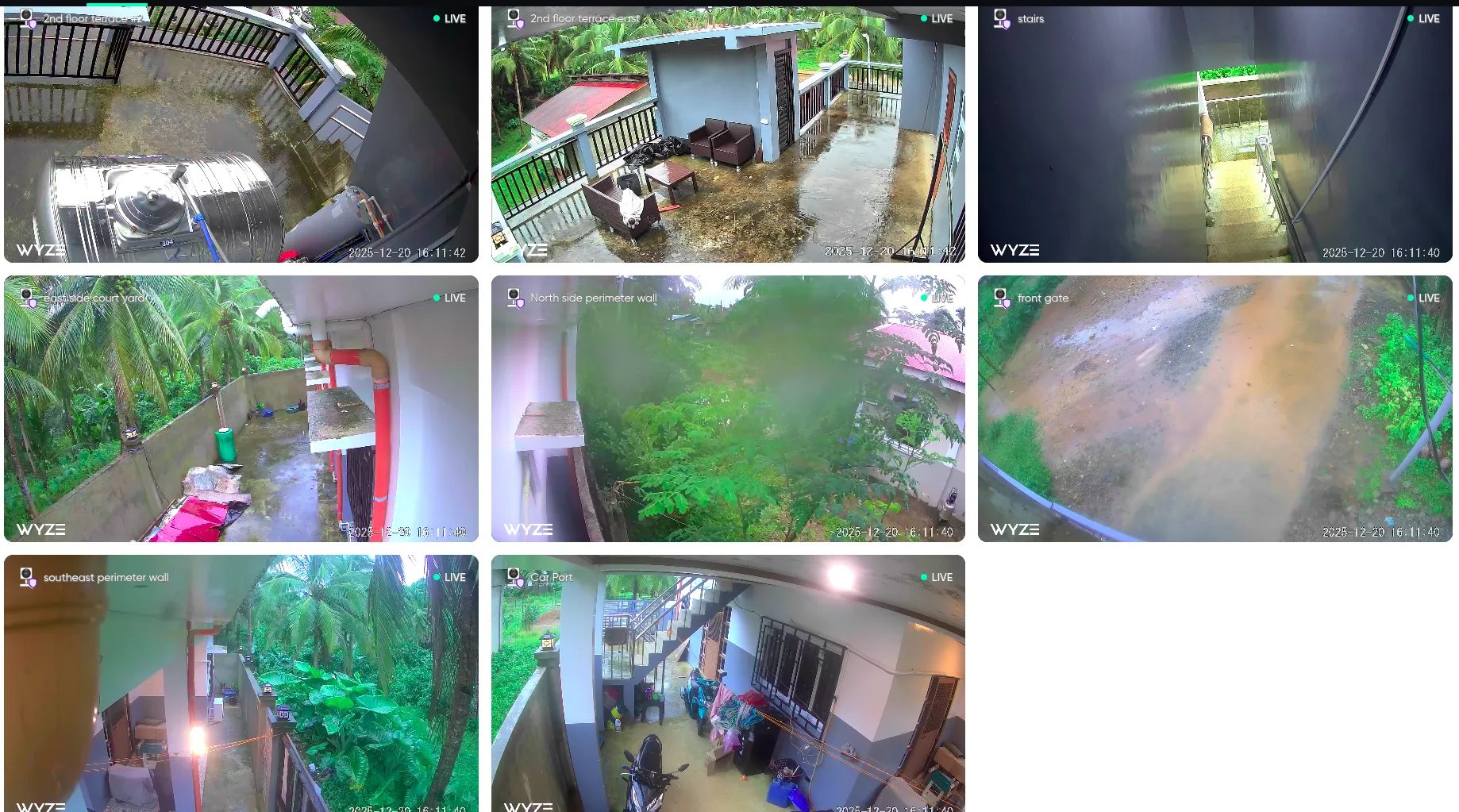
I use the Wyze Cam OG model for my outdoor cameras. I have eight currently deployed; I have one more I want to put on the top terrace, but the electrician hasn’t been able to come back to finish running the power cables yet.
I bought a couple of extra cameras (same model) to quickly replace the units when they start breaking. I’m not expecting to get more than 3-5 years out of these cameras. In earlier blog posts, I’ve mentioned several times that I keep parts and replacements for various mechanical and electrical systems around the house because it can take weeks to get a replacement shipped here and it’s rare for a local store to have what I need.
These are wireless (wifi) cameras; so, you need wifi routers located where the cameras can access them.
The Wyze cameras send feeds to the company’s cloud-hosted infrastructure. Then, the Wyze app on my phone allows monitoring the cameras from anywhere with an internet connection—you can also use a computer and web browser to access the camera feeds or interesting events the system flagged.
The next photo shows a screenshot from a live feed from all of the external cameras around my home.
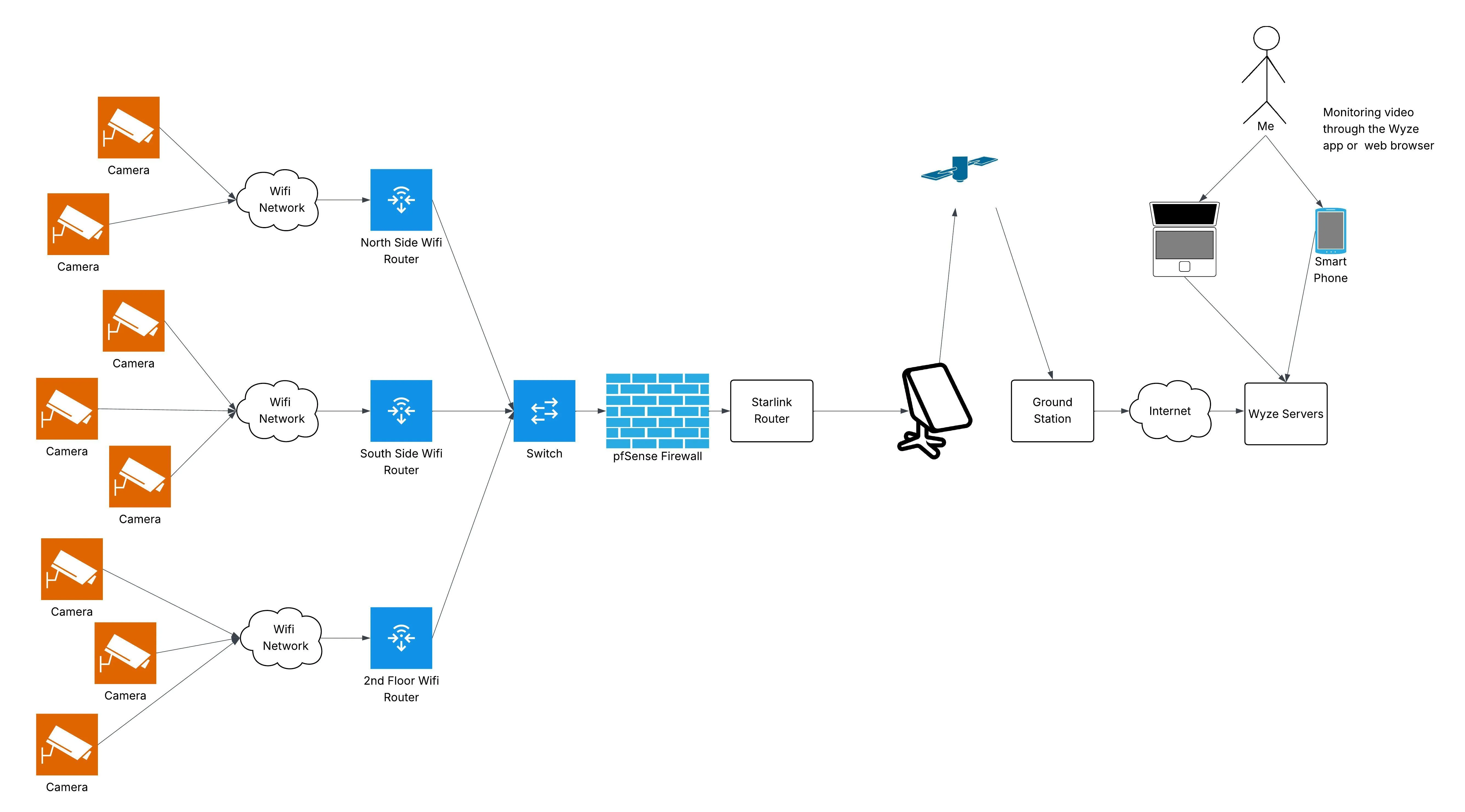
I have two wifi routers mounted on the outside of the house (opposite sides) that the wifi cameras can connect to. Those routers are connected via ethernet cables to a firewall that limits what traffic is allowed out to the internet. The firewall is in the server rack inside the house.
The Outgoing Ports used by the Wyze cameras are published. So, firewall rules can be defined based on those ports. The rules would have to use the static IP addresses of each individual camera or the source subnet to be as meaningful as possible. Unfortunately, the destination ports include TCP:443 and TCP:80, which is used by extremely common HTTP(S) traffic on the internet.
Ideally, Wyze would publish the destination IP addresses for the traffic that their cameras generates. I haven’t found that information; so, through some trial and error I figured out what the IP addresses were that were being used—it does change every now and then. I’m not expecting most people to go quite this far in securing their IP camera network, but if security is your goal, then outbound (internet egress) traffic should only be allowed to the to required IP addresses.
Likewise, if we really want to make the IP camera network as secure as possible, wired cameras should be used instead of wireless. However, if you are using wireless, then at a minimum, turn the wifi power settings down to the minimum level and enable the strongest wifi encryption protocol standard supported by your wifi router. Some of the common options are described here.
The following diagram shows my camera network at a high-level. For the non-IT professional, this may not be particularly interesting, but if you are curious, this is what I did.
I want to get that last camera on the third-floor terrace setup because while I’m working at night in my office, I often here something banging or moving around upstairs on that terrace. I’ve gone up there several times to see what is there. I never see anything. Presumably, there is a large bird landing on the top of the houe and moving around, but we’ve never seen it. I really want to catch what is making the noise on camera. When I finally have that video, it will make a great blog post.
The cameras and the wifi routers are installed under the concrete overhangs of the roof. This protects the electronics from inclement weather.
The current set of cameras are about two years old.
I have a small collection of amusing videos of lizards and large spiders climbing over the cameras. I might post some of those in a future post as well.
My Setup: The Office
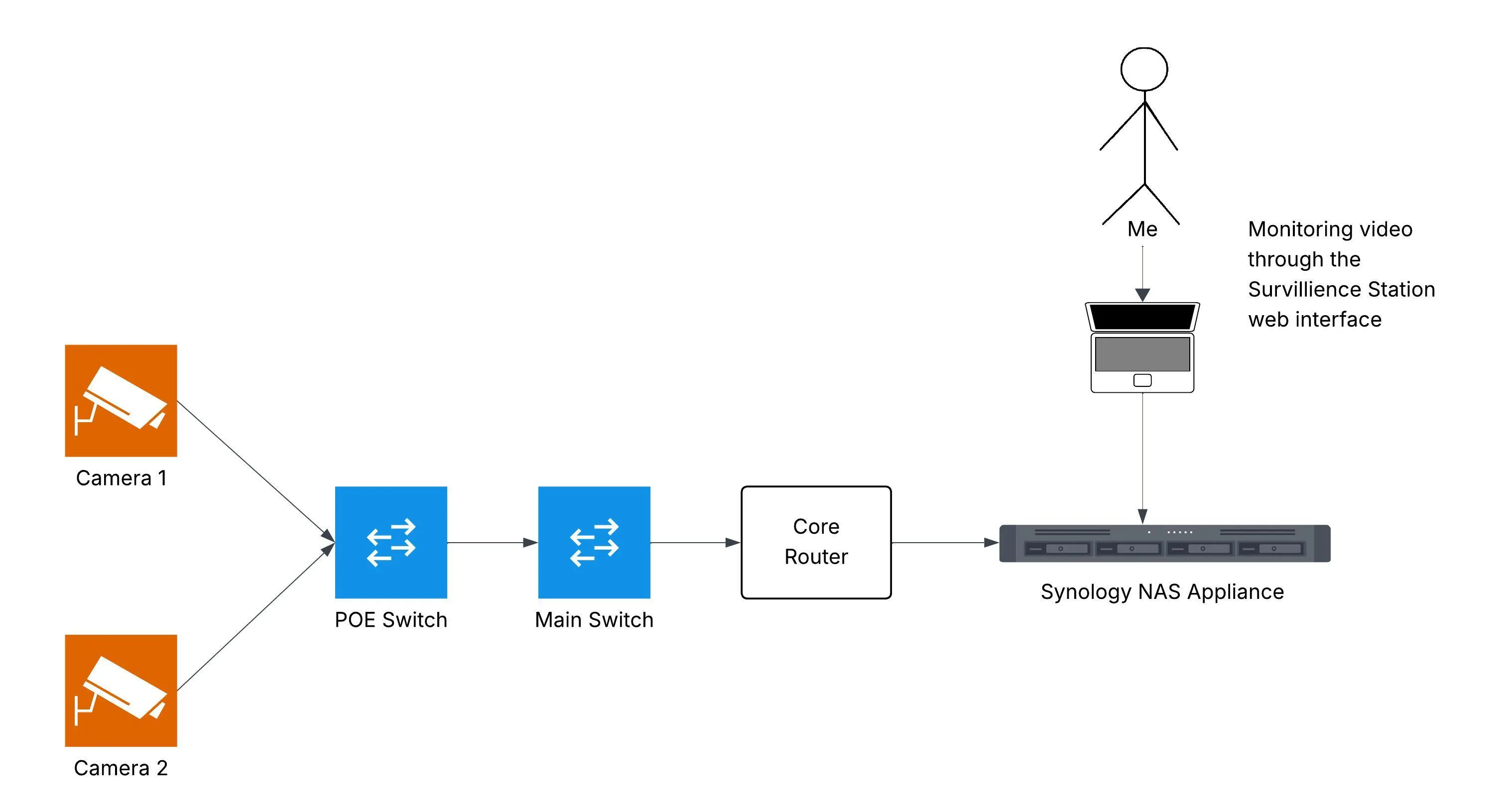
In my office on the second floor, I have a couple of these POE IP Cameras. There are special switches that support Power Over Ethernet (POE) required to power these cameras, but if you don’t have that available, it does have a convention adapter for an AC outlet. This has the advantage of requiring a single cable to be run to each device that handles both power and data. However, there is a special switch required that supports the POE standard to be able to deliver power in this manner. It costs more, but eliminates the need to run an outlet to each camera location.
My Synology NAS Appliance provides Network Video Recorder (NVR) software that can collect the data streams from the cameras. In theory, I could access the video feed over a VPN client I have on my phone, but I’ve never done this. I usually access the videos feeds to my office over the VPN client on my laptop with a web browser. The recordings are kept for thirty days.
This setup has the added benefit of not having a wifi network with the camera feeds flowing over it. So, this is going to be a bit more secure. We also don’t have to worry about properly securing the camera wifi network like we do for the external cameras.
Instead of relying upon a cloud-hosted NVR solution, the office camera setup writes all data to the Synology NAS appliance and its Network Video Recorder (NVR) software. The data is kept on the NAS appliance for thirty days. I can access live video feeds or view earlier recordings using the web interface of the NAS appliance. I can access that through my local home network or over the VPN router that I have setup.
This type of solution eliminates the dependency on the cloud and third-parties in order to function properly. So, it will continue to work even if Starlink is out. Compare this to the external cameras that have a dependency on the Starlink connection, public cloud infrastructure, and a third-party’s systems. Beyond the dependencies, we’re also eliminating a potential security attack vector and all the privacy issues associated with the cloud-hosted solution. Of course, I have to maintain all the infrastructure to make this solution work myself, including hardware redundancies necessary to make it highly available. I wouldn’t necessarily recommend most people attempt to build or maintain this system themselves.
The next photo shows the office camera network.
Privacy
If you care about your family’s privacy and your own privacy at all, you will think very carefully about what you are doing with IP cameras and public cloud components. The out-of-the-box Wyze (and many other IP camera vendors) public cloud-hosted functionality is effectiely taking everything recorded by those cameras and uploading it to a third-party system you do not control.
- Are those recordings really being deleted in the timeframe the company claims?
- Once the videos are deleted from the cloud system, is there anyway for them to be recovered?
- How diligent is the third-party about requiring a proper warrent before releasing your data to law enforcement?
- What legal jurisdiction is the data stored in? Are data sovereignty laws being obeyed?
- If the third-party that posseses your video recordings suffers a data breach, what is going to happen to all your videos?
Final Thoughts
This blog post is not a complete guide for how to securely deploy an IP camera security system. There are numerous privacy concerns associated with uploading live video feeds to a third-party cloud system.
Outdoor security cameras in the Philippines absolutely work—when deployed with realistic expectations and proper planning. The biggest mistakes come from assuming Western infrastructure, Western norms, and Western reliability apply here. They don’t.
Design for outages. Design for weather. Design for curiosity. And above all, design for the reality that your security system should keep working when everything else stops.
If you do that, cameras become a serious asset instead of an expensive false sense of security.
Thinking of Moving to the Philippines? Get Reliable Guidance
Online communities are helpful for general questions. For anything important, you still need accurate, professional, and updated information. E636 Expat Services helps foreigners with:
- Residency and long term visas
- Bank account opening
- Health insurance guidance
- Real estate assistance
- Business setup
- Retirement planning
- A smooth and secure transition into life in the Philippines
If you want to move with confidence instead of relying on random comments online, we can guide you every step of the way.
Book a consultation with E636 and start your journey the right way.
Photo by Milan Malkomes on Unsplash